|
With the Windows Eight System
Recovery
& Restoration DVD image
IT WORKS EVEN IF THE PC WON'T BOOT
With login to the dedicated support site
HERE

Does everything from replacing a missing system file
to a full Factory Fresh "Out of the Box" restore.
AS USED BY MANY PROFESSIONAL SYSTEM ENGINEERS
This SYSTEM RESTORE DISK and Web Site will fix
almost all
problems encountered relating to the Operating System on all variants
of Windows Eight.
|
Version |
x86
/ 32Bit.
|
x64
/ 64Bit. |
|
Home |
YES |
YES |
|
Professional . |
YES |
YES |
| Enterprise |
YES |
YES |
|
The disk image has been
designed to make it easy to access the (usually
hidden) recovery routines that are built into Windows by
Microsoft (and OEM's) using a variation of
Windows PE and RE ("Pre-install Environment"
and "Recovery Environment") systems.
Includes assistance from the
technical support team if needed and a web site containing pages of detailed instructions,
videos,
walkthroughs and
helpful downloads (Login Here)
IT
WORKS EVEN IF
THE PC WON'T BOOT
Because this disk uses PE
and RE it will work even if Windows Vista will not start from the hard drive.
Bby booting the computer from its own independent operating system that runs
direct from the burned DVD itself, it is not affected by existing faults with
Windows on the hard
drive.
Use this disk images repair routines to:
-
Automatic replacement of missing or broken
files essential to Windows
(Start-up Repair)
(For example, replace essential
files attacked by a virus)
-
Roll back your system to
any active historical Windows "Restore"
point. (System Restore)
(Lets you go back to before when
the problem started)
-
Restore the computer to
factory fresh "Out of the Box"
condition from an existing OEM recovery partition or user image on the hard
drive.
(System Image Recovery)
(Most branded computers no longer come
with install disks but the manufacturers (OEM's) make a "Factory Install
Image" of the operating system partition on a "Hidden" (Special Access)
recovery partition. perfect if reselling the computer )
-
Test installed hardware.
(Windows Memory Diagnostic)
(Tests installed hardware for fatal errors)
-
Command Line Tools.
(Command
Prompt)
(By
using this option you can run fixes like FixBoot, FixMBR, ScanOS and
RebuildBcd)
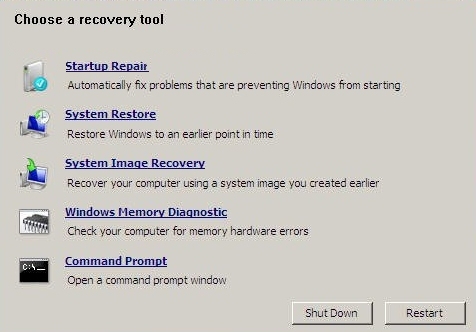
Example of
the main Recovery Options Menu
Questions & Answers:
Q.
How easy is it to use this
disk?
A.
Follow the instructions that are displayed
on screen throughout the process. Also comes with detailed instructions on
the web site to get you started with the repair procedure.
Some intermediate computer skills are required but can be attempted by the
majority of users.
Q.
What support do
you give?
A.
There is an additional support web site provided by tech who can offer extra
assistance, telephone support and direct PC-2-PC assistance if required.
If you have ANY doubts about a particular procedure
contact tech first so they can talk you through it.
Q.
Will I loose any
information / programs on my computer I have put onto it since purchase?
A. As a rule, No, Most of the recovery
procedures are non destructive. Even then, as long as you contact tech first it may be possible to backup / make
a copy of your personal data and restore it later once the system is fixed.
Q.
What is an OEM?
A. OEM stands for "Original Equipment
Manufacturer" and includes IBM, Toshiba, DELL, HP, Packard Bell, Sony, Compaq
and most other "High Street" brands.
|